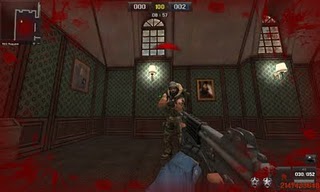
Cheat Point BLank Wallhack + Unlimited HP 11 Juli 2011

http://point-blank.at.ua/_nw/0/s60212081.jpg
Features :
- Unlimited HP
- WallHacks

Hotkeys :
# [Unlimitid HP]
- Home [ON]
- End [ Of]

# [Wall Hacks]
- Insert [ON]

Read Users' Comments (0)

Cheat Point Blank 11 Juli 2011 1HIT All SG

http://4.bp.blogspot.com/-nlNjTM6COLQ/TbTg1xIewvI/AAAAAAAAD-U/GCPShkxA2x8/s400/point-BLANK-HEAD-SHOT-KOMGUE-BLOGSPOT-COM.jpg

Fitur:

- 1 HIT SG Gosong
- 1 HIT M1887 (CASH)
- 1 HIT SPASS-15
- 1 HIT SPASS-15 D (CASH)
- 1 HIT 870MCS W.
- 1 HIT 870MCS W D (CASH)

Hotkey

No hotkey Auto on

Tutorial:

1.Run the cheat: "All SG.exe"
2.Open PB and start
3.Hit enter to close notice (Dont move mouse when do it)

Download Cheat:
Download here...


Read Users' Comments (0)

End It All 2 - tool quickly and easily closes all or selected running programs with a single click

Description:

Install utilities usually tell you to shut down all other tasks while they're operating. Other programs demand so much of your system's computing power that any concurrently running tasks will impact their performance. On today's powerful systems, you easily can have a dozen or more programs loaded at any given time. Shutting them down manually is tedious and time-consuming.

EndItAll 2 lists all the programs running on your system, and lets you decide which ones to close down. The processes necessary for basic system operation are protected from termination. From the remaining processes, you can choose which to close, which to kill (close down forcibly), and which to protect. Once you know which files you want to shut down, you can configure EndItAll for automatic action via script or batch file. This is useful for backups and defrags during off-hours. Options let you block power management and the screen saver during operation.
End It All 2 - tool quickly and easily closes all or selected running programs with a single click
  • This handy-dandy tool quickly and easily closes all or selected running programs with a single click. It's perfect to use before running Scandisk or Defrag, since those programs running in the background usually cause restarts with both utilities.
  • Just close all "visible" Windows programs, run EndItAll, then with one click, all programs (except Explorer, Systray & any others you've "protected" - like your Firewall & AV Software) are shut down.
  • EndItAll2 is also handy for closing all programs before installing software, which is usually recommended.
  • Download your copy now before it's gone ...
  • Works with Windows 95, Windows 98, Windows ME, Windows NT 4, Windows 2000, and YES is does work on Windows XP & XP Pro.
  • YES - it DOES work with VISTA & WINDOWS 7!!! (see the updates on the next page)


Download

  • EndItAll2 is also handy for closing all programs before installing software, which I always recommend.
  • EndItAll2 is one of my favourite and most often used apps
  • Download your copy now below.
  • Zip file contains set-up file, source file, license & read-me.
  • Set-up only file just contains the set-up file only
  • Sizes: 746 kb. (zip file) - 685 kb. (set-up file only)

All versions of Windows, including 98, ME, 2000, XP, Vista & Windows 7.

NOTES ON WINDOWS VISTA & WINDOWS 7: I've been getting emails asking if it works with Windows Vista & Windows 7...

UPDATED Jnjr writes me ... DoC I tried end-it-all 2 (with Vista) and it worked like a charm every time. The only program that I protected from killing was Windows explorer ( which goes without saying). This little prog works great when I want to rip a Movie/DVD or audio CD. I currently own a HP pavilion dv6265us notebook with Windows Vista. While End-It-All 2 worked for me, this does not mean it will work for everybody and your readers will have to use this at their own risk.

UPDATED Donald in Canada writes me ... Works great on Windows 7 64 BIT.

UPDATED I've used it successfully on Windows 7 Ultimate 32 BIT - DoC

One more thought on Vista/Windows 7 >>> just select End-It-All-2 to run with Administrator rights (or disable that user access control completely like most Geeks have already learned). This also applies to many other software items from my readers feedback. If you do try it, let me know what your experience is and I'll post it here. End-It-All.

Read Users' Comments (0)

Hack Unlimited Darah + 1 Hit SG Kosong + SG Spas point + Mp 7 msct + p90msct

Download :

Fitur:
-1 Hit ALl SG[Kecuali Sg Spas Cash]
-1 Hit Mp 7
-1 Hit K2
-1 Hit P90
-Unlimited darah

Hotkey : 
-1 Hit = Auoto On
-Cheat Darah On = Numpad 1
-Cheat Darah Off = Numpad 2
NB:
-Work All WINDOWS
Pasword sudah ada didalam nya

Read Users' Comments (0)

How To Edit .pdf Files

PDF-Tools 4.0.0197 Full + Keygen + Patch | 11 Mb


Allowing both the creation (from Image file formats, Image Scanners/Web CAMS and text files etc) and manipulation of Adobe compatible PDF files, PDF-Tools is an ideal tool to compliment your existing PDF creation application or as a 'stand alone' tool in it's own right! And PDF-Tools requires no additional 'plug-ins' or applications such as Adobe Acrobat or Distiller.

Functions:
• Scan/Import Images from any Twain or WIA device to PDF
• Convert Text files to PDF
• Batch convert Image file formats to PDF (allows user to mount muliple images vertically/horizontally per page)
• Merge and/or Overlay PDF pages and files
• Delete or extract Pages from a PDF file
• Extract Images and Text from a PDF file to other formats.
• Extract formatted text and images to .RTF and .DOC and open in your preferred Word Processor etc for editing/re-formatting
• Create & Edit Bookmarks
• Create Thumbnails
• Add Header/Footer style Watermark text
• Re-number pages (i.e. after merging multiple files) - includes intelligent Macro's to automate and overprint in required location of page(s)
• Merge (overlay) PDF pages as stationary/forms onto text or another PDF pages - in background or foreground mode.
• Send Functions:(Applies to all file types, not simply PDF's)
• Email (Via MAPI or SMTP)
• FTP - FTP your Files to a Server
• HTTP - Post files to a Server
• Optimise font embedding in existing PDF files.
• Add/Modify Security with both 40/128 Bit & AES encryption supported
• Add text or Image based Watermarks to pages or entire files.

Read Users' Comments (0)

Cara Merubah Flashdisk 1GB menjadi 2GB

Pernah kebayang gak kalu Flashdisk 1GB milik kalian bisa di rubah kapasitasnya menjadi 2GB hhhmm… gak mungkin kali ya, tapi saya sendiri telah membuktikan nya bahwa itu bisa. Bagai mana cara nya?? Cukup mudah kok tingal download file nya DISINI

Dan tinggal di jalankan


Pada kolom G:\ di ganti dengan drive di mana flashdsisk kalian terdeteksi oleh windows Lalu klik fix


Klik ok


Ini print screen dari flashdisk saya yang pertamanya 1GB menjadi 2GB dan saya coba masukan data dan aman.. tapi hanya dapat digunakan satu kali saja jika diformat mengunakan fasilitas windows software ini tidak akan bisa lagi berjalan.. jadi kalo udah jadi 2GB jgn di format lagi
Selamat mencoba

Maaf jika postigan nya ketingalan jaman ^_^ hanya sekedsar berbagi

Read Users' Comments (0)

Mengatasi masalah Driver Computer

 
Kali ini saya akan bercerita sedikit mengenai masalah driver computer yang agak sulit di cari di internet. Mungkin ada tapi susah cari nya, ini akan sulit jika seorang teknisi pemula seperti saya jika sedang menginstall computer atau laptop konsumen dan mereka tidak lagi memiliki CD Driver dai PC maupun Laptop tersebut. Dan pengalaman ini yang sering saya alami apa lagi tidak ada koneksi internet. Huuu sangat susah bahkan kita akan di caci maki haha!! Kejam

Alternative pertama yang di lakukan adalah sebelum menginstall computer atau laptop terlebih dahulu memback-up drivernya jika computer masih bias booting di windows banyak software yang beredar untuk memback-up driver computer atau laptpop. Kalian bisa mengunakan Hirren Boot CD, Doubel Driver dan lain sebagainya. Tentunya kalian =sudah pada tahu mengunakan software-software memback-up driver tersebut dan saya tidak perlu menjelakan nya lagi ^^

Yang kedua bisa mengunakan ID Hardware pada saat setelah menginstal computer tersebut dengan cara. Tekan icon windows+pause break pada keyboard atau di icon my computer di desktop klik kanan lalu pilih properties dan akan tampil kotak dialog seperti di bawah jika kalian mengunakan windows 7
 
Lalu pilih davice manager dan cari tulisan yang berwarna kuning. Mengapa tulisan yang berwarna kuning. Itu menandakan bahwa driver computer atau laptop kalian belum terinstall driver nya
Lalu klik dan pilih salah satu driver yang belum di install klik kanan pilih properties dan klik tab details di sana ada ID hardware copy ID tersebut dengan keyboard Ctrl+C untuk mengcopy ID tersebut lalu browsing di internet masuk web DavID.info paste kan ID yang telah di copy tapi jika kalian beruntung maka driver yang di cari akan langsung ada dan dapat di ungah secara free tapi kebanyakan pasti berhasil dan sedikit kemungkinan driver tidak di temukan.

Dan alternative yang ketiga adalah mengunakan software driver robot bias cari di internet install driver robot tersebut dan matikan dahulu koneksi internet kalian klik SCAN pada menui Driver Robot. Software ini akan mengscan computer anda dan save file tersebut yang berbentu HTML. Hidupkan kembali koneksi kalian lalu klik file html yang tapi lalu download driver yang di perlukan. Software ini juga tidak selamanya file yang di download bias jalan di computer dan laptop kalian jadi pilihlah yang sesuai

Yang terakhir jika kalian mengunakan computer yang masih lama dan computer yang lama itulah yang driver nya bermasalah karena CD driver nya sudah hilang atau entah kemana. Pakai lah windows spack 3 yang sudah editan dan mendukung driver tunggal bias di cari di kosovaDC untuk mendownload windows tersebut terlebih dahulu kalian harus sing in jika inggin melihat konten link download nya.
buat akun nya karena free

 cukup itu saya yang saya ketahui selama saya menjadi teknisi kurang lebih 2 tahun dan dan jika ada yang kurang saya minta maaf hehe jika ada masukan silahkan beri komentar agan-agan sekalian..

Read Users' Comments (0)


Related Posts Plugin for WordPress, Blogger...
Get Free Music at www.divine-music.info

Free Music Online at divine-music.info